MemCache
High-speed local query caching and token reduction tier for autonomous AI coding agents and developer workflows.
MemCache
High-speed local query caching and token reduction tier for autonomous AI coding agents and developer workflows.
MemCache eliminates redundant context consumption, accelerates repetitive developer tooling commands, and cuts API token burn. By caching deterministic tool outputs, document digests, and read-only repository inspections, MemCache allows agentic AI systems and developers to operate at full speed without repeatedly reading unchanged files or burning context budgets.
Pitch: Stop Burning Tokens on Unchanged Reality
Modern AI coding agents frequently re-inspect repositories, query issue trackers, run Git commands, and read documentation files. In multi-agent and continuous development loops, many agent reads are identical queries against unchanged local state.
Typical API gateways attempt to solve this by sitting between the agent and LLM providers as a proxy. MemCache rejects that approach.
MemCache is never a proxy. It never intercepts subscription CLIs, gateways, or model endpoints. Instead, MemCache saves tokens and time at the source by shrinking what agents read. If a Git status, file digest, or issue inspection is unchanged, MemCache returns verified, cryptographic cached results in milliseconds, bypassing the filesystem scan or reducing hundreds of lines of documentation down to essential, structured digests.
Key Features
1. Provenance-Based Freshness (Zero Stale Serving)
Traditional caches rely on arbitrary Time-To-Live (TTL) timers, risking serving outdated information. MemCache enforces strict cryptographic provenance:
- Every cached entry tracks its exact dependencies: file SHA-256 hashes, Git HEAD commits, uncommitted working-tree diffs, and directory manifests.
- If a dependency changes by even a single byte or modified timestamp, the cache entry is immediately flagged as stale and refused (exit code 2).
- MemCache never serves stale data as fresh. An unprovable observation fails closed, forcing fresh execution.
2. Allowlisted Read-Only Command Memoization
MemCache safely memoizes expensive, repeated read-only developer commands:
- Version Control:
git status,git diff,git log, and repository porcelain queries. - Project Tracking: CLI issue queries, item listings, and task details.
- Coordination & Inboxes: Agent mailboxes, status snapshots, and local service registries.
- Strict security boundaries: Mutating commands (
rm,mv,git commit,git push, etc.) are unconditionally rejected.
3. High-Density Document & Repository Digests
Instead of feeding raw 10,000-token rule files or codebases into prompt contexts repeatedly:
- MemCache provides precomputed, deterministic digests that retain headings, structural declarations, tables, and uppercase prohibitions.
- Fallback integration with local offline language models (e.g. Ollama) generates concise summaries without sending proprietary code to third-party endpoints.
- SecretGuard protection automatically detects and sanitizes keys, tokens, and sensitive credential formats before storage.
4. Native Model Context Protocol (MCP) Support
MemCache ships with a standard Model Context Protocol stdio server (memcache-mcp):
- Exposes tools directly to AI coding environments (Claude Desktop, Antigravity, Cursor, Codex).
- Parity guaranteed: MCP tools execute the identical validation, parsing, and caching engine as the command-line interface.
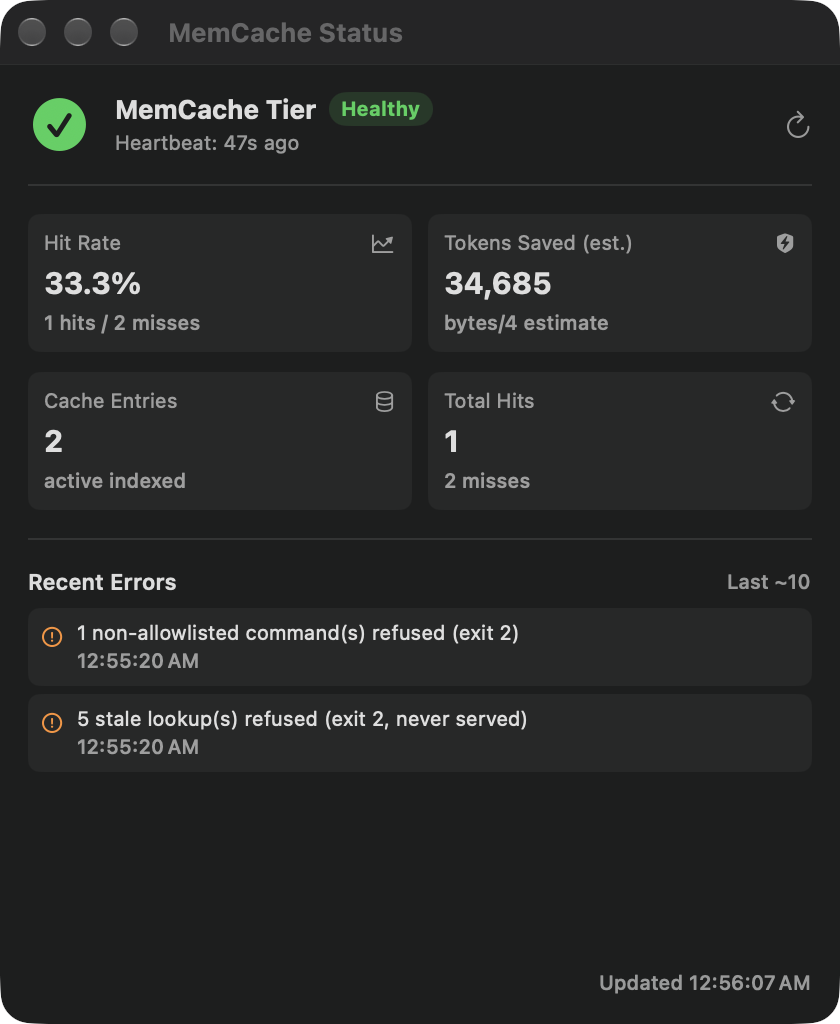
5. Native macOS Menu-Bar Utility (memcache.app)
- Lightweight accessory app (
LSUIElement) living in the macOS menu bar. - Health status indicator dynamically tinted by cache freshness (Green: Healthy, Orange: Stale, Red: Offline).
- In-process background heartbeat validating freshness every 180 seconds with positive-control canary checks.
- Real-time display of hit rate, total hits, active entries, and estimated tokens saved (
bytes / 4). - Native SwiftUI diagnostic window (
MemCacheStatusView) accessible directly from the menu bar.
Architecture & Principles
| Principle | MemCache Implementation |
|---|---|
| Never a Proxy | Operates strictly out-of-band. Never sits between coding assistants and LLM endpoints. |
| Fail Closed | If freshness cannot be mathematically proven via dependency hashes, execution is refused. |
| Privacy First | Secret keys, passwords, and tokens are never cached, displayed, or written to disk. |
| Universal Binary | Dual-slice native execution (arm64 Apple Silicon and x86_64 Intel). |
| Zero Daemon Clutter | Runs in-process or as a lightweight menu bar utility; no complex background daemons required. |
Platforms & System Requirements
- Operating System: macOS 26.7 or later.
- Hardware Architecture: Universal2 Mach-O binary (Apple Silicon M1/M2/M3/M4 and Intel Xeon/Core processors).
- Security & Code Signing: Apple Developer ID signed with hardened runtime, notarized by Apple, and stapled.
- Storage: Lightweight transactional SQLite database in the user's home folder with WAL mode.
- Integrations: CLI terminal, Model Context Protocol (MCP stdio), and SwiftUI Status UI.
Status & Availability
- Current Release: Version
1.1.0(Build3), Universal2. - Availability: Actively deployed across internal development fleets and developer workstations.
- Distribution: Internal fleet release via developer packaging and local application installation. App Store submission is not planned.
- Pricing: Internal developer utility / Core open architecture (Commercial pricing: TBD / Planned).
Quick Start & Usage
Basic CLI Usage
# Get or compute a deterministic digest of a file
memcache get file:path/to/ARCHITECTURE.md

# Run an allowlisted read-only command through the cache
memcache run -- git status --short

# Inspect cache statistics and estimated tokens saved
memcache stats

# Verify cache integrity and run the stale-canary positive control
memcache verify
AI Agent MCP Integration
Add MemCache to your MCP configuration (claude_desktop_config.json or agent settings):
{
  "mcpServers": {
    "memcache": {
      "command": "/Applications/memcache.app/Contents/MacOS/memcache-mcp"
    }
  }
}
Application Interface & Telemetry