
Native Apple-Platform Software Studio · New York, NY

East Coast Science — Native Apple-Platform Apps & Systems Tooling

We design and build high-precision native applications for macOS, iOS, and iPadOS—combining SwiftUI, Universal2 Apple Silicon & Intel binaries, local-first storage, and zero-telemetry privacy.

Featured Apps
RTTy & hyperFile
Network observability & APFS metadata
Architecture
Universal2 Gate
macOS 27 (Apple Silicon) + 26.7 (Intel)
Privacy Policy
Zero Trackers
No advertising SDKs or data brokers
Response SLA
48-Hour Response
Dedicated engineering support inbox
Live on Mac App Store
rtty.app
RTTy app icon

RTTy — Network Latency, Loss & Observability

macOS Universal2 · iOS & iPadOS Companion

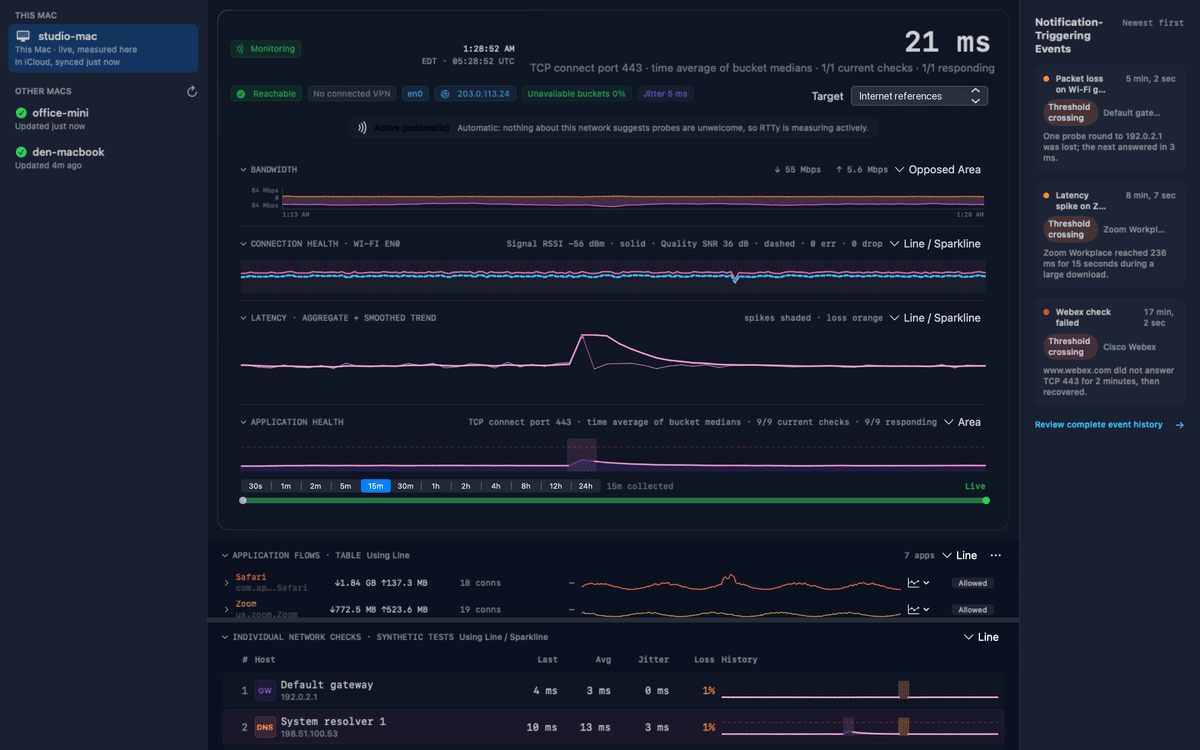
RTTy is a native Apple-platform application for inspecting current network behavior and recent measurement history. Its engine continuously measures local network targets, renders an aggregate heatmap plus rolling-average latency in the menu bar, attributes socket flows per application, and opens a comprehensive desktop dashboard.

macOS universal2 iOS & iPadOS Companion Liquid Glass UI Private iCloud Sync Zero Ads & Analytics
Software Portfolio

Shipping Applications

Native macOS, iOS, and iPadOS applications and edge services with dedicated product pages and real screenshots.

·
RTTy app icon

Network Observability · Network

Mac App Store

Continuous ICMP and TCP latency, jitter, and packet loss monitoring with an aggregate menu-bar heatmap, application flow attribution, desktop dashboard, and local-first iCloud sync.

macOS universal2iOSiPadOSSwiftUI
Open RTTy → macOS · iOS / iPadOS
Specifications & Features v0.3.865 (Build 548) · Universal2 (arm64 + x86_64) · Mac App Store
  • Continuous latency, jitter, and loss measurements to default gateway, DNS resolvers, and custom targets
  • Aggregate menu-bar heatmap, rolling-average latency badge, and per-application socket flow telemetry
  • Wide all-target detail panel and comprehensive desktop dashboard
  • Liquid Glass design with True Black and Space Blue themes
  • Local-first iCloud synchronization with iOS and iPadOS companion
  • Zero tracking, zero analytics, zero external dependencies

hyperFile app icon

Filesystem & Metadata Inspector · Systems

Shipping · v0.17.7

Native macOS extended attribute (xattr) inspector, Quarantine & Provenance decoder, CloudKit sync state analyzer, and APFS duplicate scanner with FSEvents real-time indexing.

macOS universal2Swift CLIAPFSSpotlight
Open hyperFile → macOS 15+
Specifications & Features v0.17.7 (Build 68) · Universal2 (arm64 + x86_64) · Signed & Notarized
  • Structured decoding of com.apple.quarantine, com.apple.provenance, and CodeSignature blobs
  • Content-addressed SHA-256 duplicate scanning across APFS volumes and cloud storage folders
  • Real-time FSEvents filesystem monitoring with sub-second SQLite FTS5 search
  • Cloud-eviction awareness across iCloud Drive, Dropbox, Google Drive, and OneDrive
HyperCPU app icon

Hardware & Thermal Monitor · Telemetry

Shipping · v1.0.0

Real-time CPU power, frequency, temperature, utilization, GPU activity, load averages, swap, and kernel limits in a configurable menu-bar and desktop dashboard.

macOS universal2Apple SiliconIntel
Open HyperCPU → macOS 14+
Specifications & Features v1.0.0 (Build 6) · Universal2 · Developer ID Signed
  • Per-core P-core and E-core utilization, frequency, power draw, and thermal telemetry
  • GPU utilization and unified memory allocation tracking across Apple Silicon and Intel
  • System counters: open files, vnodes, load averages, and swap churn
  • Configurable Classic and 2-Column Grid dashboard layouts with menu-bar sparklines
HyperTune app icon

System Telemetry & Workbench · Systems

Shipping · v1.0.0

Native macOS system monitoring and performance workbench with real-time inspection of CPU activity, memory pressure, kernel sysctl parameters, and network resolver guidance.

macOS universal2Apple SiliconIntel
Open HyperTune → macOS 14+
Specifications & Features v1.0.0 (Build 1) · Universal2 · Developer ID Signed
  • Real-time inspection of kernel limits, sysctl keys, memory pressure, and process tables
  • Safe sandboxed tuning previews and interactive system parameter documentation
  • Network Configuration and DNS resolver latency guidance with menu-bar status
cveDB app icon

Vulnerability & Threat Intelligence · Security

Shipping · v1.1.0

Local-first macOS vulnerability intelligence workstation and Cloudflare Edge archive indexing 408,000+ NVD CVEs, CISA Known Exploited Vulnerabilities (KEV), and EPSS probability scores.

macOS universal2SQLite FTS5Web Edge
Open cveDB → macOS 15+ · Web
Specifications & Features v1.1.0 (Build 8) · Universal2 + Live Web Service (cvedb.dev)
  • Offline 4.18 GB SQLite FTS5 vulnerability database with 408,215 NVD records and 389,842 EPSS scores
  • Real-time CISA KEV catalog tracking, CVSS v3.1/v4.0 filtering, and incremental feed synchronization
  • Built-in local CLI and Model Context Protocol (MCP) agent query access alongside cvedb.dev
XEntropy app icon

Credential Inventory & Posture · Security

Shipping · v0.4.1

Apple-first, local-first credential operations tool to discover, inventory, and track versions and rotations of API keys across dotfiles and Keychain without touching external providers.

macOS universal2KeychainCLI
Open XEntropy → macOS 15+
Specifications & Features v0.4.1 (Build 5) · Universal2 · Signed & Notarized
  • Audits developer environments, shell configs, and macOS Keychain for credential posture
  • Tracks credential ages, rotations, and scope metadata without ever exposing secret values
  • Zero outbound network access: 100% local-first execution
xSite app icon

Offline Site Snapshot & Auditor · Productivity

Shipping · v0.4.0

Deterministic website crawler, offline archive builder, Lighthouse performance auditor, and snapshot diff verifier for macOS engineers and researchers.

macOS universal2SwiftUICLI
Open xSite → macOS 15+
Specifications & Features v0.4.0 (Build 101) · Universal2 · Signed & Notarized
  • High-concurrency polite crawler with automatic link rewriting for self-contained offline browsing
  • Complete capture of HTML, CSS, JS, fonts, images, and OpenGraph metadata
  • Built-in performance scoring and deterministic snapshot diffs for regression verification
xTokens app icon

Local LLM Token Telemetry · Telemetry

Shipping · v0.3.1

Local-first macOS menu bar utility that scans Claude Code, Codex, and Gemini CLI session logs on disk to visualize token consumption, cache read/write ratios, and 52-week activity heatmaps.

macOS universal2Menu BarZero Network
Open xTokens → macOS 14+
Specifications & Features v0.3.1 (Build 5) · Universal2 · Signed & Notarized
  • 100% offline JSONL transcript parser for local AI coding harnesses with zero network permissions
  • 52-week contribution-style token activity heatmap in a clean macOS MenuBarExtra popover
  • Per-project and per-model breakdown of input, output, cache creation, and cache read tokens
xReaper app icon

Process & Port Hygiene · Systems

Shipping · v1.0.0

Orphaned process detector, runaway CPU/memory governor, and listening-port inspector for macOS developer workstations.

macOS universal2Menu BarCLI
Open xReaper → macOS 15+
Specifications & Features v1.0.0 (Build 1) · Universal2 · Signed & Notarized
  • Identifies orphaned build daemons, wedged test runners, and stale language servers
  • Instant port-to-PID mapping and process tree ancestry inspection
  • Graceful SIGTERM-then-SIGKILL reaping with configurable safety allow-lists
memcache app icon

Local Key-Value & Query Cache · Systems

Shipping · v1.2.0

Sub-millisecond local read-through cache and TTL store for expensive CLI queries, build metadata, and developer workflows.

macOS universal2SQLite WALCLI
Open memcache → macOS 15+
Specifications & Features v1.2.0 · Universal2 · Native App + CLI
  • Sub-millisecond cache hits backed by memory-mapped SQLite WAL storage
  • Deterministic exit codes for stale/miss detection in shell pipelines
  • Menu-bar hit-rate telemetry, memory budget ring, and one-click namespace pruning
ramDisk app icon

APFS Volatile Scratch Workspace · Systems

Shipping · v1.1.0

High-speed APFS memory-backed scratch volume manager for macOS build caches, compiler artifacts, and zero-SSD-wear temporary workspaces.

macOS universal2APFS RAM DiskMCP
Open ramDisk → macOS 15+
Specifications & Features v1.1.0 · Universal2 · Native App + CLI + MCP
  • One-click creation and ejection of case-sensitive or standard APFS RAM volumes
  • Real-time throughput, IOPS, and capacity telemetry in a native desktop dashboard
  • Automatic build-cache redirection for Xcode DerivedData, SwiftPM, and Node caches
FirmwareDB app icon

Apple Firmware Catalog · Edge Service

Live Service · v0.2.0

Authoritative Apple hardware firmware catalog, Boot ROM / iBoot / SEP subsystem inspector, and IPSW/OTA signing status service.

macOS universal2iOSEdge API
Open FirmwareDB → macOS · iOS · Cloudflare API
Specifications & Features v0.2.0 · Universal2 App + Live Edge API (firmwaredb.app)
  • Inspects 10 hardware firmware subsystems including Boot ROM/iBoot, SMC, Secure Enclave (SEP), and DCP
  • Sub-millisecond IPSW and OTA signing status queries for macOS, iOS, iPadOS, and visionOS
  • Public REST API running on the Cloudflare Workers edge network at firmwaredb.app
In Development & Internal Preview

Coming Soon

Roadmap
tyrell app icon

tyrell

Autonomous Systems Suite

Next-generation multi-host macOS workstation telemetry, background job orchestration, and local-first engineering control plane.

macOS 15+ Coming Soon
ScanRoo app icon

ScanRoo

Document Scanner & OCR

Local-first camera and file scanner with on-device Vision OCR, producing searchable PDF, Markdown, and plain text.

iOS · iPadOS · macOS Preview →
ReceiptRoo app icon

ReceiptRoo

Financial Document Scanner

On-device receipt scanning, automatic merchant/date/total extraction, mathematical balance verification, and searchable PDF export.

iOS · macOS Preview →
DataRoo app icon

DataRoo

Mac Inventory & Catalog

Comprehensive macOS system inspector and hardware catalog with duplicate detection and read-only mobile viewer.

macOS · iOS Preview →
xNamed app icon

xNamed

DNS & mDNS Inspector

Real-time DNS resolver auditor, Bonjour/mDNS service browser, and split-horizon routing verifier for macOS.

macOS 15+ Preview →
About East Coast Science

About & Engineering Standards

Independent New York software studio building native Apple-platform applications and developer infrastructure.

Developer ID: east coast science, llc (ZU2882L4HT)

East Coast Science, LLC is an independent software and systems engineering company based in New York, NY. We build native macOS, iOS, and iPadOS applications alongside high-availability edge services—focusing on network observability, filesystem telemetry, on-device document intelligence, and developer workflow automation.

Every native application we ship is written in Swift and SwiftUI, compiled as a Universal2 binary supporting both Apple Silicon (arm64) and Intel (x86_64) Macs, signed with our Apple Developer ID (ZU2882L4HT), and notarized by Apple.

ecs.config.yaml
production · 2026.1
# East Coast Science LLC Operational Profile
entity:        East Coast Science, LLC
developer_id:  ZU2882L4HT (east coast science, llc)
domain:        eastcoastscience.com (canonical)
support_email: support@eastcoastscience.com
platforms:     [macOS 27.0, macOS 26.7 (Intel), iOS 18+, iPadOS 18+, Cloudflare Edge]
build_gate:    universal2 (arm64 + x86_64) · Developer ID signed & notarized
privacy:       zero third-party tracking · no ads · local-first iCloud sync

Universal2 Binary Gate

Universal2 is a mandatory build gate across all East Coast Science macOS applications. Every app builds dual slices for arm64 (Apple Silicon, targeting macOS 27.0) and x86_64 (Intel, targeting macOS 26.7). The release pipeline verifies lipo -archs before packaging.

Developer ID Application Signing

All production binaries are signed with the company Developer ID certificate (Developer ID Application: east coast science, llc (ZU2882L4HT)), built with Apple Hardened Runtime, cryptographically timestamped, and stapled after automated Apple notarytool notarization.

Local-First & Private iCloud

Application data resides locally in the user's secure application container. Cross-device synchronization operates strictly through the user's personal, end-to-end encrypted iCloud account. No East Coast Science server retains, inspects, or has access to customer measurement or document data.

Privacy Covenant

East Coast Science applications contain zero advertising SDKs, zero user-tracking frameworks, and zero third-party telemetry. Diagnostic logging is strictly opted-in and sanitized. We do not sell or monetize personal data under any circumstances.

System Topology

Architecture & Tier Model

High-level architectural blueprint across client, local engine, and edge tiers.

╭────────────────────────────────────────────────────────────────────────╮
│                         TIER 1: APPLE CLIENT LAYER                     │
│                                                                        │
│   ┌───────────────────────────┐      ┌─────────────────────────────┐   │
│   │   RTTy (macOS 27/26)      │      │  hyperFile & HyperCPU (Mac) │   │
│   │   SwiftUI · Liquid Glass  │      │  APFS metadata & thermals   │   │
│   └─────────────┬─────────────┘      └──────────────┬──────────────┘   │
│                 │                                   │                  │
│                 ▼                                   ▼                  │
│   ┌───────────────────────────┐      ┌─────────────────────────────┐   │
│   │  ReceiptRoo & ScanRoo     │      │  iOS / iPadOS Companions    │   │
│   │  On-device Vision OCR     │      │  Private iCloud Containers  │   │
│   └───────────────────────────┘      └─────────────────────────────┘   │
╰──────────────────────────────────────┬─────────────────────────────────╯
                                       │ Local Inter-Process / SQLite WAL
                                       ▼
╭────────────────────────────────────────────────────────────────────────╮
│                  TIER 2: LOCAL ENGINES & DEVELOPER CLI                 │
│                                                                        │
│   ┌───────────────────────────┐      ┌─────────────────────────────┐   │
│   │  memcache & XEntropy      │      │  xSite, xNamed & xReaper    │   │
│   │  Local cache & Keychain   │◄────►│  Crawling, DNS & process    │   │
│   └───────────────────────────┘      └─────────────────────────────┘   │
╰──────────────────────────────────────┬─────────────────────────────────╯
                                       │ HTTPS / Edge CDN / REST
                                       ▼
╭────────────────────────────────────────────────────────────────────────╮
│                     TIER 3: CLOUDFLARE EDGE NETWORK                    │
│                                                                        │
│   ┌───────────────────────────┐      ┌─────────────────────────────┐   │
│   │  firmwaredb.app           │      │  cvedb.dev                  │   │
│   │  Firmware catalog API     │      │  Security tracker archive   │   │
│   └───────────────────────────┘      └─────────────────────────────┘   │
│   ┌────────────────────────────────────────────────────────────────┐   │
│   │  eastcoastscience.com (Bare Apex Canonical)                    │   │
│   │  Cloudflare Pages Static Portal & Documentation                │   │
│   └────────────────────────────────────────────────────────────────┘   │
╰────────────────────────────────────────────────────────────────────────╯
Contact & Assistance

Contact East Coast Science

Direct engineering support, product inquiries, and customer assistance for all East Coast Science applications.

Email Support
support@eastcoastscience.com
48-hour SLA response guarantee
Telephone
646-355-8705
Monday–Friday, 9:00 AM – 6:00 PM ET

Reporting Defects & Feedback

Submit bug reports or feature requests directly to support@eastcoastscience.com or call 646-355-8705. Every message is triaged by an engineer within 48 hours.

bug-report.template support@eastcoastscience.com
To: support@eastcoastscience.com
Subject: [Bug] App Name - Brief Summary
Platform: macOS 27.0 / macOS 26.7 / iOS 18
Version: Build Number & Architecture
Steps: 1. Launch  2. Action  3. Expected vs Actual