xattr
A high-performance, privacy-first file discovery and identity platform for macOS.
xattr: Intelligent File Identity, Discovery, and Deduplication for macOS
Pitch: A high-performance, privacy-first file discovery and identity platform for macOS. Understand what every file is, where its copies live, and retrieve documents by semantic identity—without moving, renaming, or modifying user files.
Overview
xattr is the unified file discovery, identity, and deduplication layer for macOS. Traditional search tools rely on fragile folder hierarchies, volatile modification timestamps, or slow full-disk scans that alter storage states. xattr indexes files where they already reside, determines their cryptographic and functional content identity, detects cloud storage residency without triggering unwanted downloads, and classifies documents into structured functional kinds (such as statements, invoices, and receipts).
xattr consolidates disparate indexing and deduplication utilities into a single, cohesive architecture delivered through four primary interfaces:
- macOS Native App (
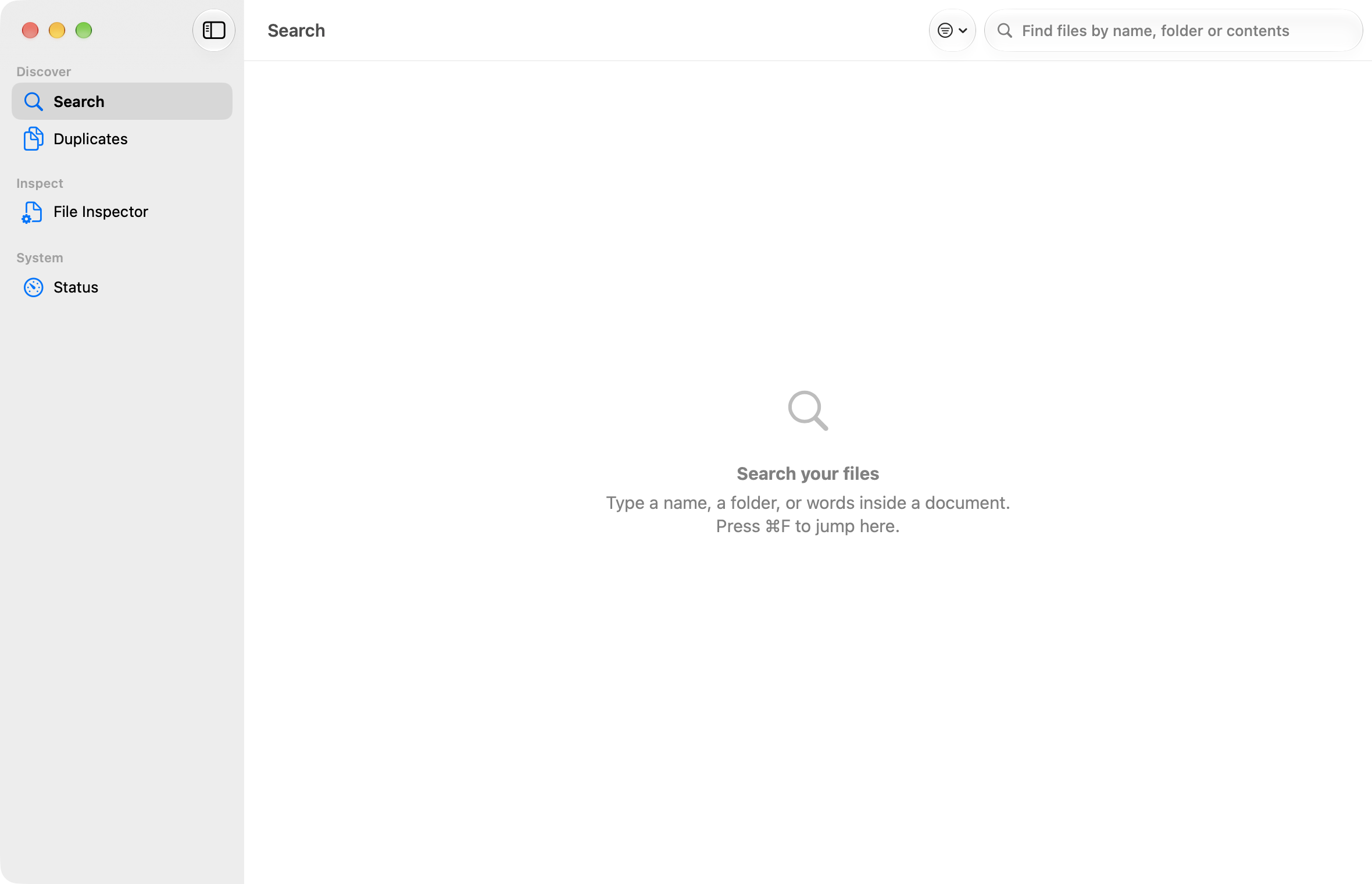
xattr.app): A clean SwiftUI desktop application with search, duplicate reporting, tag inspection, and real-time status telemetry. - Command-Line Interface (
xattrctl): An ergonomic, scriptable CLI outputting versioned JSON schemas (xattr.*.v1) with dry-run mutation safety. - Model Context Protocol Server (
xattr-mcp): A strictly read-only, permission-scoped stdio MCP server enabling AI agents and assistants to safely discover and reference documents. - Background Indexing Service (
xattrd): AnSMAppService-managed daemon; background scheduling and pressure tuning are active work.
Key Features
1. Multi-Tiered Content Hashing & Identity
Files are designed to be tracked by content rather than file path. The tiered hashing pipeline is the target architecture; the full hash-engine work is in progress and is not all shipped in build 9:
- Tier 0 (Metadata Pre-Filter): Rapid
statinspection categorizing files by size buckets, skipping zero-byte and dataless placeholders. - Tier 1 (Sampled Quick Hash, in progress): Computes a deterministic 32 KiB partial hash (
head-tail-union-16k-v1combining the initial 16 KiB and final 16 KiB) using the planned XXH3/BLAKE3 engine to eliminate non-matching candidates with minimal I/O. - Tier 2 (Full Streaming Dual-Hash, planned): Reads candidate contents once through aligned streaming buffers, computing BLAKE3 (the planned primary 256-bit identifier) and SHA-256 (for interoperability).
- Tier 3 (Perceptual & Near-Duplicate Analysis — Planned): Perceptual hashing for visual media (dHash and DCT pHash for images, keyframe extraction for video) and MinHash with Locality-Sensitive Hashing (LSH) for text documents.
2. Non-Hydrating Cloud Residency Detection
Cloud synchronization services frequently manage offline files using dataless placeholders. xattr is designed to inspect approved cloud roots—including iCloud Drive, Dropbox, Google Drive, Microsoft OneDrive, and Box—without triggering unwanted file downloads; the current root-scope amendment is still planned:
- Zero-Hydration Guarantee: Uses low-level Darwin filesystem attributes (
lstat,SF_DATALESS,st_blocks, and VFS policy controls) to detect offline states without fetching remote bytes. - Detailed Residency States (planned model): Classifies items as
local,cloud-only (dataless),downloading,pinned, orpointer(such as web-native Google Docs/Sheets stubs). - Storage Accounting: Reports actual local on-disk allocated bytes versus total logical storage per provider. (Note: Indexing of cloud storage roots is subject to index scope configuration).
3. Read-Only Duplicate Reporting
- APFS Reclaimable Accounting (in progress): The duplicate report is read-only; parity work is completing the distinction between same-volume reclaimable space and cross-volume redundancy (such as backups, external drives, or network storage).
- Strict Non-Destructive Invariant: In v1, deduplication is strictly an observational, read-only report. Destructive operations (such as automatic deletion, hardlinking, or APFS block cloning) are intentionally excluded from the core runtime engine.
4. Sandboxed Identifier Modules & Findings
xattr specifies an extensible modular architecture for transforming raw filesystem entries into semantic domain objects; module runs and content classification remain foundation/planned work:
- Strict Execution Sandbox: Modules operate strictly read-only (
O_RDONLY | O_NOFOLLOW), with zero network access, hard execution deadlines, memory budgets, and automatic poison-pill quarantine after repeated failures. - Two-Phase Analysis: High-throughput microsecond pre-filtering based on file metadata, followed by budgeted content inspection (text extraction and on-device OCR) managed via a host-enforced content access interface.
- Calibrated Findings: Emits structured records containing detected functional kinds (e.g.,
receipt,invoice,statement,tax_form), calibrated probability confidence scores (0.0 to 1.0), and extracted metadata fields with explicit evidence trails. - Declarative Custom Rules: Users can author declarative YAML rules to boost, veto, or require specific classifications, creating custom kinds namespaced under
user.<kind>.
5. Mutation Safety & Attribute Journaling
- Dry-Run by Default: CLI and application mutations require explicit confirmation (
--apply). - Comprehensive Rollback Journal: When metadata write-back is enabled (such as Finder tags or synchronized
#Srecords), previous attributes are captured in an append-only rollback journal; the complete label writer is planned. Cryptographic hashes are verified before and after every operation to guarantee that underlying file contents remain entirely unmodified.
Platforms & Requirements
| Specification | Requirement / Implementation |
|---|---|
| Target Architecture | Universal 2 (arm64 Apple silicon + x86_64 Intel 64-bit) |
| Minimum Operating System | macOS 26.0+ |
| Code Signing & Security | Developer ID Application signed, Hardened Runtime enabled, Apple Notarized, and ticket stapled |
| System Permissions | Full Disk Access (FDA) recommended for complete volume indexing; non-root user execution |
| Core Binaries | xattr.app (GUI), xattrctl (CLI), xattr-mcp (MCP Server), xattrd (Background Daemon) |
| Distribution Channel | Direct Developer ID distribution (current); Mac App Store edition (planned) |
Current Status & Availability
- Release Version:
0.9.0(Build9) - Verified Build State: Universal 2 binary, Apple Notarized, validated across Apple silicon and Intel architectures.
- Deployment Status: Active production track for Developer ID direct installations.
- Pricing: Planned. No pricing decision has been made. Commercial licensing, any purchase model, and the App Store edition are planned and pending formal business determination.
Roadmap
┌─────────────────────────────────────────────────────────────────────────────────┐
│ Current Release: v0.9.0 (Build 9)                                               │
│ • Universal 2 Developer ID build with Hardened Runtime & Notarization           │
│ • xattrctl CLI with JSON output & xattr-mcp read-only agent server              │
│ • Scoped POSIX indexing, Time Machine snapshot diffing, & read-only dedup       │
└───────────────────────────────────────┬─────────────────────────────────────────┘
                                        │
                                        ▼
┌─────────────────────────────────────────────────────────────────────────────────┐
│ Parity Lane A (Core Engine) & Advanced Hashing                                  │
│ • Content-vs-Location database schema v2 (volume_uuid, inode, status)           │
│ • Native streaming dual-hash engine (BLAKE3 SIMD runtime dispatch + SHA-256)   │
│ • Near-duplicate findings (dHash/pHash images, MinHash/LSH documents)           │
│ • Epistemic verification badges (Candidate, Inferred, Verified, User Override)  │
└───────────────────────────────────────┬─────────────────────────────────────────┘
                                        │
                                        ▼
┌─────────────────────────────────────────────────────────────────────────────────┐
│ Parity Lane B (UI Workspace)                                                    │
│ • Unified All Files browser with multi-dimensional location & residency chips   │
│ • Combined token filter bar with Boolean logic                                  │
│ • Interactive proposal editor & review queue with dry-run ledger               │
│ • Visual hierarchy polish & comprehensive accessibility tooltips                │
└───────────────────────────────────────┬─────────────────────────────────────────┘
                                        │
                                        ▼
┌─────────────────────────────────────────────────────────────────────────────────┐
│ Network Ecosystem (Planned / Roadmap)                                           │
│ • Phase A Fingerprint DB: Replicated local/host hash index for rapid fleet dedup│
│ • Phase B xattr.org: Planned open community file identity commons featuring     │
│   opt-in sharing strictly limited to common-file fingerprints, requiring prior  │
│   formal privacy and legal review before public deployment                      │
└─────────────────────────────────────────────────────────────────────────────────┘
Documentation & Product Resources
- CLI Reference Guide: Run
xattrctl --helporxattrctl <subcommand> --helpfor complete usage syntax. - MCP Integration Spec: Documentation on connecting
xattr-mcpto compliant agent environments usingagent-scope.json. - System Architecture: Detailed engineering specifications and database schema documentation in internal project records.
Links
- Public product URL: planned.
Application Interface & Telemetry